Wednesday, April 22, 2020

How To Repair A Crashed SD Card And Protect Your Data

One of the many reasons users prefer Android devices is the ability to expand the amount of available storage space using the MicroSD Card. Since we have the ability add up to 256GB of external storage to Android devices today, you're bound to choke up when the SD card crashes without any tell-tale signs.
If you're experiencing issues on how to repair a crashed SD card on your Android device, there are certain fixes you can try out. Since there's not a singular solution to SD Card issues, we've created a guide to help you detect the issue with your external storage and mentioned multiple solutions to get your SD card working and even retrieve your stored data along with it.


Before you start

Don't format the card if you want to retain any of the photos on it. You can follow the tips in our separate article on how to format a write-protected SD card after you've tried to recover any files that are on your card.

Now, try and find a different card reader. If you've inserted an SD card into your laptop or PC's built-in slot and nothing happens, try using a different computer or a USB card reader.
Sometimes it's the reader at fault – not the card. You can buy a USB SD card reader online for just a couple of pounds which will accept both microSD and standard SD cards.

Steps to Repair a Crashed SD Card and Protect your Data:

Step 1 – Physically clean the SD Card

Despite being durable and built to last, SD cards are prone to crashing sometimes due to physical damage. Since you carry your phone around everywhere, some dirt and dust are bound to fill up in the cracks, that can make SD card stop working from time to time.
The first thing you can try to do on how to repair a crashed SD card is physically scrub and clean it.
  • Remove the MicroSD card from your Android device and place it on a clean surface. Make sure that you turn off your phone before pulling out the SD card for safety.
  • Flip the MicroSD card and using a white eraser, gently scrub the gold contact pins of the SD card to get rid of any residual dirt or grime.
  • If you have an alcohol-based cleaning solution or even nail polish remover around, dab it on to the connector pins using a Q-tip and gently rub it.
Once the SD card has dried out, you can plug it back into your Android device and turn it on to see if the solution has worked.


Step 2 – Format the SD Card

If your SD card is being detected by the Android device but you're having trouble accessing the saved files, there's a good chance that the files are corrupt. This could either be due to a particular broken file in the saved storage, or a virus that is causing the issue.
Either way, the only option there is left for you to try out is make the SD card reusable for formatting it.
  • From the home screen of your Android device, head over to the Settings app and then scroll down to find the Storage
  • In the Storage tab, you'll be able to find the Erase SD Card option, so go ahead and select it.
  • Confirm your action to delete all of the files and folders stored on your SD card and this should effectively solve the issue.

Step 3 – Check the SD card compatibility

If you are trying to figure out how to repair a crashed SD card on an older Android device, you might just need to look at the details more carefully. If your SD card fails to be recognized on the mobile device but works with your computer, the problem could be related to compatibility.
  • If the MicroSD card that you are trying to use with your older phone is SDXC version (built for higher transfer speeds), it will not be recognized.
  • Look up the maximum capacity of expandable storage that is supported by your device, since they can vary from starting at 64GB to all the way up to 256GB.

Step 4 – Diagnose the SD card using a PC

If a simple format did not help you solve the SD card problem, you might need a more technical analysis of the issue. To do so, you can plug in your SD card into a computer and use the diagnostic tools to find out the pertaining errors and effectively fix them.
  • Connect your Android mobile device to a computer using a USB cable.
  • Make sure that you connect Android as MSC (Mass storage mode) and not MTP (Media transfer mode). You can do this using the notification menu once you connect the phone to your computer.
  • Launch the Windows Explorer and right click on the SD card driver you see on the screen. In the options menu, choose Properties – Tools – Error Checking and wait for the entire process to complete.
  • The computer will try to update the software for your SD card and fix any errors that are causing it to crash.

Step 5 – Use chkdsk to fix/repair a corrupted SD card without data loss

The "chkdsk" command is your first choice for damaged SD card repair. Requiring no format, it allows you to fix or repair a corrupted SD card and regain access to all your important files on the device. Let's see how it works. (I'm using Windows 7 for this demonstration)
1. Plug in your SD card to your computer with a card reader.
2. Go to the start menu, type in "cmd" in a search bar, hit enter and then you can see something named "cmd. exe" in a list of programs.
3. Right-click "cmd. exe" and then you will get the following command windows that allow you to fix your corrupted SD card without formatting.
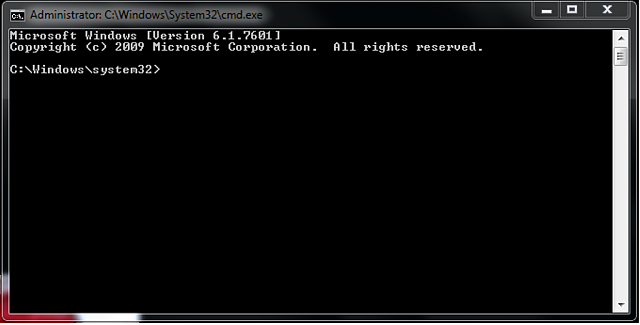
4. Type in "chkdsk /X /f sd card letter:" or "chkdsk sd card letter: /f ", for example,"chkdsk /X /f G:" or "chkdsk h: /f".
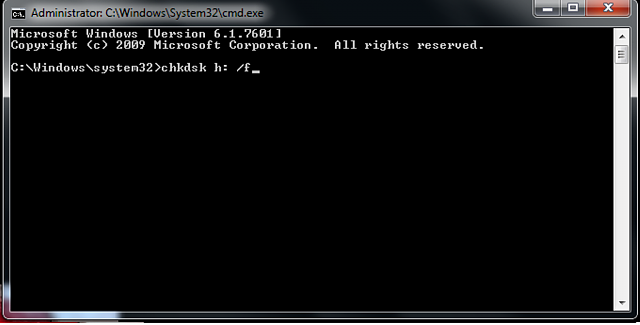
After finishing all the steps, Windows will have checked and fixed the file system of the SD card. It usually takes several minutes. After that, if you see "Windows has made corrections to the file system" in the command window, then congratulations! The damaged SD card is successfully fixed and you can see your data again. If not, you should try a third-party data recovery software to retrieve your files from the damaged SD card and repair it by formatting.
Once the process has been completed, you can go ahead and pop the SD card back into your Android device and see if the issue has been resolved.

Step 6 : Use EaseUS Data Recovery Wizard to recover data from damaged SD card

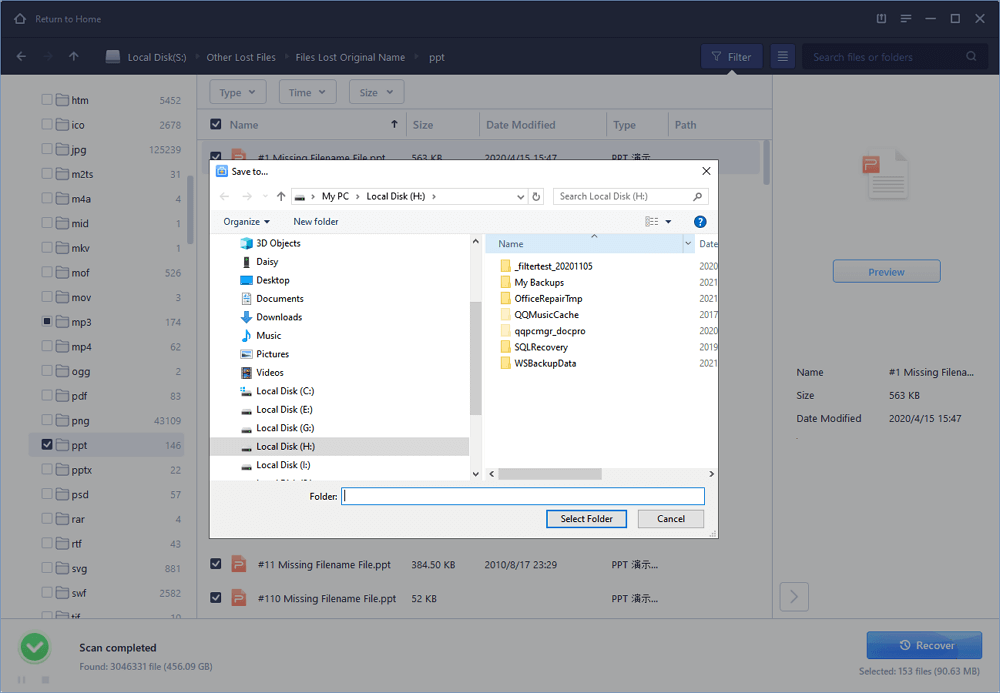
1. Connect the corrupted SD card to your PC, launch EaseUS's data recovery software, select the card and click "Scan".
2. A quick scan will first start to search all the lost and existing data on the SD card. And after that, a deep scan will automatically launch in order to find more files.
3. After the scan, choose those files you want to recover and click the "Recover" button to retrieve them back.
Final Words :

So finally through this article, you have got to know about the method by which the SD card could be repaired and hence the data in it could be saved for the further access. We have tried to present the method in easy to grab manner and we believe that you could possibly get to know about it easily. Hope that you would have liked the information in this post, if it is so then please share it with others. Also, do not forget to share the post with others, let most of the people know about the method. Share your comments about the post through using the comment box below. At last never the fewer thanks for reading this post!

More articles


  1. Hacking Usb
  2. Hacking Social
  3. Hacking Definicion
  4. Foro Hacking
  5. Hacking Basico
  6. Aprender A Ser Hacker
  7. Como Aprender A Hackear Desde Cero
  8. Blackhat Hacking

RED_HAWK: An Information Gathering, Vulnerability Scanning And Crawling Tool For Hackers


About RED_HAWK: RED_HAWK is a all in one tool for Information Gathering, Vulnerability Scanning and Crawling. A must have tool for all pentesters and hackers.

RED_HAWK's features:
  • Basic ScanSite Title (NEW):
       IP Address
       Web Server Detection IMPROVED
       CMS Detection
       Cloudflare Detection
       robots.txt Scanner
  • Whois Lookup (IMPROVED)
  • Geo-IP Lookup
  • Grab Banners IMPROVED
  • DNS Lookup
  • Subnet Calculator
  • Nmap Port Scan
  • Sub-Domain Scanner IMPROVED:
       Sub Domain
       IP Address
  • Reverse IP Lookup and CMS Detection IMPROVED:
       Hostname
       IP Address
       CMS
  • Error Based SQLi Scanner
  • Bloggers View NEW
       HTTP Response Code
       Site Title
       Alexa Ranking
       Domain Authority
       Page Authority
       Social Links Extractor
       Link Grabber
  • WordPress Scan NEW
       Sensitive Files Crawling
       Version Detection
       Version Vulnerability Scanner
  • Crawler
  • MX Lookup NEW
  • Scan For Everything - The Old Lame Scanner
List of CMS Supported on RED_HAWK
   RED_HAWK's CMS Detector currently is able to detect the following CMSs (Content Management Systems) in case the website is using some other CMS, Detector will return could not detect.
  • WordPress
  • Joomla
  • Drupal
  • Magento

RED_HAWK Installation
   How To Configure RED HAWK with moz.com for Bloggers View Scan?
   All set, now you can enjoy the bloggers view.

How to use RED_HAWK?

Known Issues of RED_HAWK
   ISSUE: Scanner Stops Working After Cloudflare Detection!
   SOLUTION: Use the fix command (for Debian-based distros) or manually install php-curl and php-xml.

   Watch the video to see how to solve that isuue:

Support and Donations
   Found RED_HAWK cool? Well you could buy a cup of tea for the author 😉 Just send any amount of donations (in Bitcoin) to this address: 1NbiQidWWVVhWknsfPSN1MuksF8cbXWCku

   Can't donate? well that's no problem just drop a "THANK YOU, AUTHOR" this will motivate me to create more exciting stuffs for you ðŸ˜‰

TODOs for RED_HAWK:
  • Make a proper update option ( Installs current version automatically )
  • Add more CMS to the detector
  • Improve The WordPress Scanner ( Add User, Theme & Plugins Enumeration )
  • Create a web version of the scanner
  • Add XSS & LFI Scanner
  • Improve the Links grabber thingy under bloggers view
  • Add some other scans under the Bloggers View


Related news


KPOT Info Stealer Samples


KPOT Stealer is a "stealer" malware that focuses on stealing account information and other data from various software applications and services

References

1.  2020-04-19 Didier Stevens posted analysis of KPOT infostealer on the Infosec Handlers Diary blog "KPOT Analysis: Obtaining the Decrypted KPOT EXE"
These are samples to follow his analysis routine.

2. 2019-05-09 Proofpoint. New KPOT v2.0 stealer brings zero persistence and in-memory features to silently steal credentials


Download

             Other malware


Download. Email me if you need the password (see in my profile)


Hashes

1. From Didier Stevens' post

MD5  56ad7b243511ee7398d43df7643dc904
SHA-1  ae5ab7798ca267b1265a0496c562f219821d17cf
SHA-256  3fd4aa339bdfee23684ff495d884aa842165e61af85fd09411abfd64b9780146

2. From Proofpoint

MD5 7d7667ddce8fd69a0fd50bb08c287d10
SHA-1 087fc3e9a082983ee6a2b25f0ccb09eb723e0f39

SHA-256 67f8302a2fd28d15f62d6d20d748bfe350334e5353cbdef112bd1f8231b5599d

MD5 45ddc687f88b45fc3fec79f9dc8b38e2
SHA-1 de37b748e0e32d96c31f469f9ba4ea4f11e3e78b
SHA-256 36dcd40aee6a42b8733ec3390501502824f570a23640c2c78a788805164f77cecontagio.deependresearch.org/crime/kpotstealer(proofpoint)_win_samp.zip

Related posts


Monday, April 20, 2020

RED_HAWK: An Information Gathering, Vulnerability Scanning And Crawling Tool For Hackers


About RED_HAWK: RED_HAWK is a all in one tool for Information Gathering, Vulnerability Scanning and Crawling. A must have tool for all pentesters and hackers.

RED_HAWK's features:
  • Basic ScanSite Title (NEW):
       IP Address
       Web Server Detection IMPROVED
       CMS Detection
       Cloudflare Detection
       robots.txt Scanner
  • Whois Lookup (IMPROVED)
  • Geo-IP Lookup
  • Grab Banners IMPROVED
  • DNS Lookup
  • Subnet Calculator
  • Nmap Port Scan
  • Sub-Domain Scanner IMPROVED:
       Sub Domain
       IP Address
  • Reverse IP Lookup and CMS Detection IMPROVED:
       Hostname
       IP Address
       CMS
  • Error Based SQLi Scanner
  • Bloggers View NEW
       HTTP Response Code
       Site Title
       Alexa Ranking
       Domain Authority
       Page Authority
       Social Links Extractor
       Link Grabber
  • WordPress Scan NEW
       Sensitive Files Crawling
       Version Detection
       Version Vulnerability Scanner
  • Crawler
  • MX Lookup NEW
  • Scan For Everything - The Old Lame Scanner
List of CMS Supported on RED_HAWK
   RED_HAWK's CMS Detector currently is able to detect the following CMSs (Content Management Systems) in case the website is using some other CMS, Detector will return could not detect.
  • WordPress
  • Joomla
  • Drupal
  • Magento

RED_HAWK Installation
   How To Configure RED HAWK with moz.com for Bloggers View Scan?
   All set, now you can enjoy the bloggers view.

How to use RED_HAWK?

Known Issues of RED_HAWK
   ISSUE: Scanner Stops Working After Cloudflare Detection!
   SOLUTION: Use the fix command (for Debian-based distros) or manually install php-curl and php-xml.

   Watch the video to see how to solve that isuue:

Support and Donations
   Found RED_HAWK cool? Well you could buy a cup of tea for the author 😉 Just send any amount of donations (in Bitcoin) to this address: 1NbiQidWWVVhWknsfPSN1MuksF8cbXWCku

   Can't donate? well that's no problem just drop a "THANK YOU, AUTHOR" this will motivate me to create more exciting stuffs for you ðŸ˜‰

TODOs for RED_HAWK:
  • Make a proper update option ( Installs current version automatically )
  • Add more CMS to the detector
  • Improve The WordPress Scanner ( Add User, Theme & Plugins Enumeration )
  • Create a web version of the scanner
  • Add XSS & LFI Scanner
  • Improve the Links grabber thingy under bloggers view
  • Add some other scans under the Bloggers View


Related word
  1. Hack Rom Tools
  2. Pentest Tools For Windows
  3. Hack Tools Pc
  4. Hacker Tools For Mac
  5. Pentest Automation Tools
  6. Hacking Tools For Pc
  7. Best Pentesting Tools 2018
  8. Free Pentest Tools For Windows
  9. Termux Hacking Tools 2019
  10. Pentest Reporting Tools
  11. Pentest Tools Website
  12. Pentest Tools Download
  13. Hacking Tools Name
  14. Ethical Hacker Tools
  15. Pentest Tools Alternative
  16. Underground Hacker Sites
  17. Hacker Hardware Tools
  18. Hacker Tools 2020
  19. Pentest Tools Url Fuzzer
  20. Pentest Tools Subdomain
  21. Pentest Reporting Tools
  22. Pentest Reporting Tools
  23. Pentest Automation Tools
  24. Hack Tools For Ubuntu

How Do I Get Started With Bug Bounty ?

How do I get started with bug bounty hunting? How do I improve my skills?


These are some simple steps that every bug bounty hunter can use to get started and improve their skills:

Learn to make it; then break it!
A major chunk of the hacker's mindset consists of wanting to learn more. In order to really exploit issues and discover further potential vulnerabilities, hackers are encouraged to learn to build what they are targeting. By doing this, there is a greater likelihood that hacker will understand the component being targeted and where most issues appear. For example, when people ask me how to take over a sub-domain, I make sure they understand the Domain Name System (DNS) first and let them set up their own website to play around attempting to "claim" that domain.

Read books. Lots of books.
One way to get better is by reading fellow hunters' and hackers' write-ups. Follow /r/netsec and Twitter for fantastic write-ups ranging from a variety of security-related topics that will not only motivate you but help you improve. For a list of good books to read, please refer to "What books should I read?".

Join discussions and ask questions.
As you may be aware, the information security community is full of interesting discussions ranging from breaches to surveillance, and further. The bug bounty community consists of hunters, security analysts, and platform staff helping one and another get better at what they do. There are two very popular bug bounty forums: Bug Bounty Forum and Bug Bounty World.

Participate in open source projects; learn to code.
Go to https://github.com/explore or https://gitlab.com/explore/projects and pick a project to contribute to. By doing so you will improve your general coding and communication skills. On top of that, read https://learnpythonthehardway.org/ and https://linuxjourney.com/.

Help others. If you can teach it, you have mastered it.
Once you discover something new and believe others would benefit from learning about your discovery, publish a write-up about it. Not only will you help others, you will learn to really master the topic because you can actually explain it properly.

Smile when you get feedback and use it to your advantage.
The bug bounty community is full of people wanting to help others so do not be surprised if someone gives you some constructive feedback about your work. Learn from your mistakes and in doing so use it to your advantage. I have a little physical notebook where I keep track of the little things that I learnt during the day and the feedback that people gave me.


Learn to approach a target.
The first step when approaching a target is always going to be reconnaissance — preliminary gathering of information about the target. If the target is a web application, start by browsing around like a normal user and get to know the website's purpose. Then you can start enumerating endpoints such as sub-domains, ports and web paths.

A woodsman was once asked, "What would you do if you had just five minutes to chop down a tree?" He answered, "I would spend the first two and a half minutes sharpening my axe."
As you progress, you will start to notice patterns and find yourself refining your hunting methodology. You will probably also start automating a lot of the repetitive tasks.

Related articles
  1. How To Install Pentest Tools In Ubuntu
  2. Blackhat Hacker Tools
  3. How To Make Hacking Tools
  4. Best Pentesting Tools 2018
  5. Pentest Tools Review
  6. Hack Tools For Windows
  7. Hacker Tools 2020
  8. Hack Tools For Pc
  9. Pentest Tools Website Vulnerability
  10. Hacking Tools Name
  11. Hack Tools Pc
  12. Hack Rom Tools
  13. Pentest Tools Kali Linux
  14. Tools Used For Hacking
  15. Hack Rom Tools

BurpSuite Introduction & Installation


What is BurpSuite?
Burp Suite is a Java based Web Penetration Testing framework. It has become an industry standard suite of tools used by information security professionals. Burp Suite helps you identify vulnerabilities and verify attack vectors that are affecting web applications. Because of its popularity and breadth as well as depth of features, we have created this useful page as a collection of Burp Suite knowledge and information.

In its simplest form, Burp Suite can be classified as an Interception Proxy. While browsing their target application, a penetration tester can configure their internet browser to route traffic through the Burp Suite proxy server. Burp Suite then acts as a (sort of) Man In The Middle by capturing and analyzing each request to and from the target web application so that they can be analyzed.


Everyone has their favorite security tools, but when it comes to mobile and web applications I've always found myself looking BurpSuite . It always seems to have everything I need and for folks just getting started with web application testing it can be a challenge putting all of the pieces together. I'm just going to go through the installation to paint a good picture of how to get it up quickly.

BurpSuite is freely available with everything you need to get started and when you're ready to cut the leash, the professional version has some handy tools that can make the whole process a little bit easier. I'll also go through how to install FoxyProxy which makes it much easier to change your proxy setup, but we'll get into that a little later.

Requirements and assumptions:

Mozilla Firefox 3.1 or Later Knowledge of Firefox Add-ons and installation The Java Runtime Environment installed

Download BurpSuite from http://portswigger.net/burp/download.htmland make a note of where you save it.

on for Firefox from   https://addons.mozilla.org/en-US/firefox/addon/foxyproxy-standard/


If this is your first time running the JAR file, it may take a minute or two to load, so be patient and wait.


Video for setup and installation.


You need to install compatible version of java , So that you can run BurpSuite.
Related articles

  1. Pentest Tools Android
  2. Hacking Tools For Games
  3. Hack Tools Mac
  4. World No 1 Hacker Software
  5. Best Pentesting Tools 2018
  6. Hack And Tools
  7. Github Hacking Tools
  8. Pentest Tools Website Vulnerability
  9. Hacker Tools Free Download
  10. Pentest Recon Tools
  11. What Are Hacking Tools
  12. Hack Apps
  13. Hacking Tools Free Download
  14. Growth Hacker Tools
  15. What Are Hacking Tools
  16. Hacking Tools Download
  17. Pentest Tools Free
  18. Hacker Tools Software
  19. Pentest Recon Tools

goGetBucket - A Penetration Testing Tool To Enumerate And Analyse Amazon S3 Buckets Owned By A Domain


When performing a recon on a domain - understanding assets they own is very important. AWS S3 bucket permissions have been confused time and time again, and have allowed for the exposure of sensitive material.

What this tool does, is enumerate S3 bucket names using common patterns I have identified during my time bug hunting and pentesting. Permutations are supported on a root domain name using a custom wordlist. I highly recommend the one packaged within AltDNS.

The following information about every bucket found to exist will be returned:
  • List Permission
  • Write Permission
  • Region the Bucket exists in
  • If the bucket has all access disabled

Installation
go get -u github.com/glen-mac/goGetBucket

Usage
goGetBucket -m ~/tools/altdns/words.txt -d <domain> -o <output> -i <wordlist>
Usage of ./goGetBucket:
-d string
Supplied domain name (used with mutation flag)
-f string
Path to a testfile (default "/tmp/test.file")
-i string
Path to input wordlist to enumerate
-k string
Keyword list (used with mutation flag)
-m string
Path to mutation wordlist (requires domain flag)
-o string
Path to output file to store log
-t int
Number of concurrent threads (default 100)
Throughout my use of the tool, I have produced the best results when I feed in a list (-i) of subdomains for a root domain I am interested in. E.G:
www.domain.com
mail.domain.com
dev.domain.com
The test file (-f) is a file that the script will attempt to store in the bucket to test write permissions. So maybe store your contact information and a warning message if this is performed during a bounty?
The keyword list (-k) is concatenated with the root domain name (-d) and the domain without the TLD to permutate using the supplied permuation wordlist (-m).
Be sure not to increase the threads too high (-t) - as the AWS has API rate limiting that will kick in and start giving an undesired return code.

Related links